How Adding 4x More Memory Saved Us 50% on Lambda Costs — Here’s Why
TLDR: I ran into a weird production issue: socket timeouts in a Lambda function that had always worked fine. After a deep dive, I discovered the real cause wasn’t the network — it was CPU starvation. The fix? Adding 4x more memory, which not only solved the timeouts but also made the function run faster and 50% cheaper. Sometimes, more RAM really does make things cheaper.
It all started with a weird issue in one of our Lambda functions. Everything had been working fine — until it wasn’t.
At first, I thought it was just a flaky network problem. But after digging deeper, I found out it was actually a hidden CPU issue inside the Lambda itself.
And the fix? Adding more memory made it faster and cheaper.
The First Sign of Trouble
One afternoon, I got an alert: one of our warehouses was not receiving return transfer messages.
Okay, sounds simple. Maybe some network blip?
So I tried the usual steps:
- Re-drive failed executions.
- Increase the Lambda timeout.
- Check CloudWatch logs.
None of them worked, and something deeper was going on.
Digging Deeper
I pulled down some of the failed payload files and ran them locally.
The failures occurred before any data was sent, during the socket connection phase (the TLS handshake).
That smells like something inside the runtime is choking.
Understanding Lambda CPU Scaling
Here’s something that many developers don’t always realize about AWS Lambda:
When you increase the memory you allocate to a Lambda function, AWS also increases the amount of CPU power it gives you.
Less memory? Less CPU.
More memory? More CPU.
There is no explicit “CPU” slider in AWS Lambda — CPU is allocated proportionally to memory.
If your function does heavy data parsing, async I/O orchestration, or cryptographic handshakes, CPU matters just as much as RAM.
We had been running this function at 1 GB. It processed files over 20 MB with no issues. But a new 16 MB batch failed because it contained very large arrays of individual items.
- More memory allocations
- More work for the Node.js event loop
- Sockets stacked up waiting for event loop turns
- TLS handshakes timed out
The Lambda Math That Surprised Me
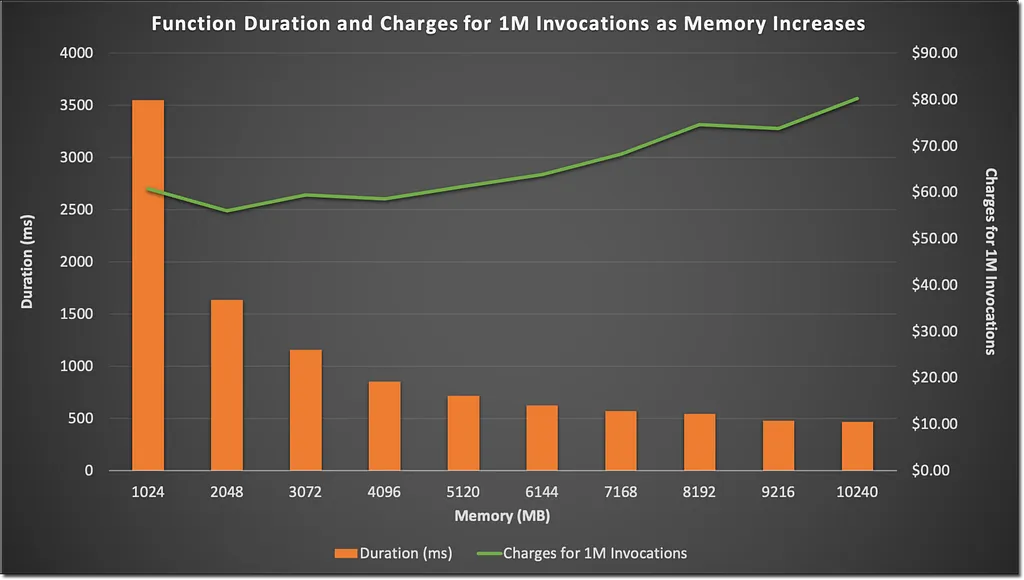
We always hear: Use less memory — it’s cheaper. But in reality:
| Memory | Avg Execution Time | Cost per Execution |
|---|---|---|
| 1 GB | 21 seconds | Base (1.0x) |
| 2 GB | 18 seconds | ~1.2x |
| 4 GB | 8 seconds | ~0.5x (50% Cheaper) |
At 4 GB:
- The function flew (8 seconds vs 21 seconds).
- No timeouts.
- Because AWS bills in GB-seconds, running 3x faster meant total billed execution seconds dropped faster than the per-second cost increase.
The Fix
- Increased memory from 1 GB → 4 GB.
- Redrove failed invocations.
All failed batches processed immediately without a single timeout, and total AWS spend on this worker was cut in half.
Key Takeaways
- More memory can save money: Faster execution can lower total GB-seconds billed.
- In Lambda, memory equals CPU: If your function does intensive I/O or crypto, memory scaling buys necessary CPU cycles.
- Socket timeouts aren’t always network issues: They can be direct symptoms of event loop starvation.